
GoFAST, a sovereign alternative to Teams, Zoom, and Google Meet
In a constantly evolving professional environment, instant messaging and video conferencing tools are essential to team performance. Remote work, multi-site organizations, and the need for responsiveness require employees to communicate easily and securely.
Faced with solutions such as Microsoft Teams, Zoom, and Google Meet, many companies are now looking for a sovereign and centralized alternative. GoFAST addresses these challenges by offering a complete collaborative platform that combines chat, video conferencing, and document management in a unified environment, with secure hosting options tailored to organizational needs.
GoFAST: a centralized collaborative DMS solution
GoFAST is not just a chat or video conferencing tool: it is a complete collaborative document management system (DMS) that centralizes all information and workflows on a single platform.
The solution includes:
- Secure enterprise chat (Element) and video conferencing (Jitsi Meet)
- Document management from creation to electronic signature
- Workflow and process automation
- Task management with Kanban
- Email (coming soon)

This centralization makes GoFAST a credible alternative to solutions such as Teams, Zoom, and Google Meet..., and more broadly to Microsoft 365, file servers, and outdated DMS solutions.
With GoFAST, everything is centralized on a single platform: teams can quickly find information, move easily from one feature to another, and collaborate in a more fluid and productive way.
Security and digital sovereignty
GoFAST stands out for its sovereign and secure approach, allowing companies to centralize their communications while maintaining full control over their data. The platform can be deployed according to needs:
- Secure SaaS (SecNumCloud): hosting in a secure French cloud compliant with regulations
- On-Premise: on-site deployment for full infrastructure control
All communications, whether chat messages or video meetings, are protected by end-to-end encryption, ensuring the confidentiality of sensitive information and GDPR compliance.
Chat with Element and video conferencing with Jitsi Meet: essential building blocks
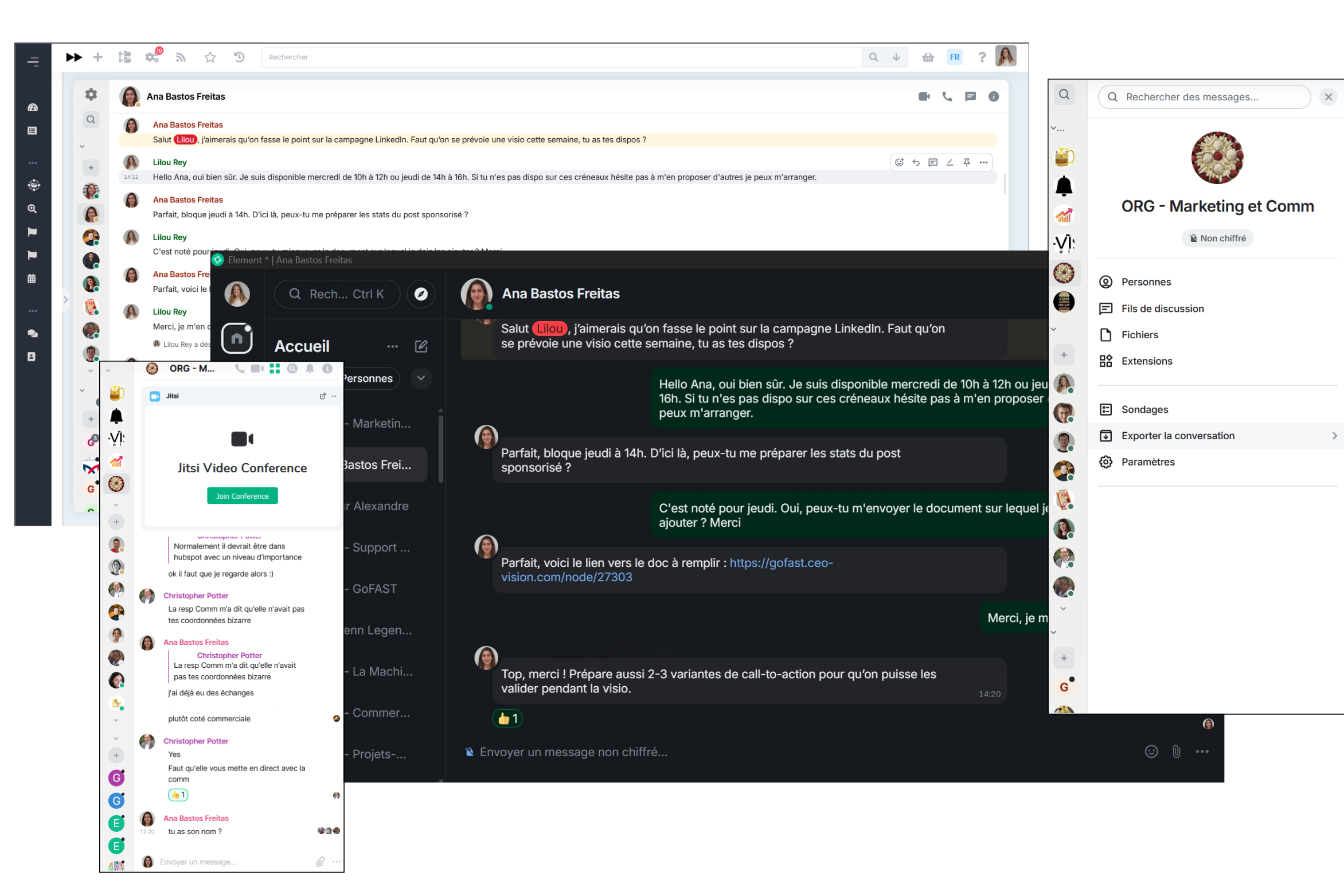
Integrated into GoFAST, chat with Element and video conferencing with Jitsi Meet are the two pillars of remote communication.
Chat with Element
- Secure instant messaging, one-to-one or in groups
- File and document sharing
- Full conversation history and advanced search
- Customizable notifications
- Enables centralization of all professional discussions and reduces fragmentation
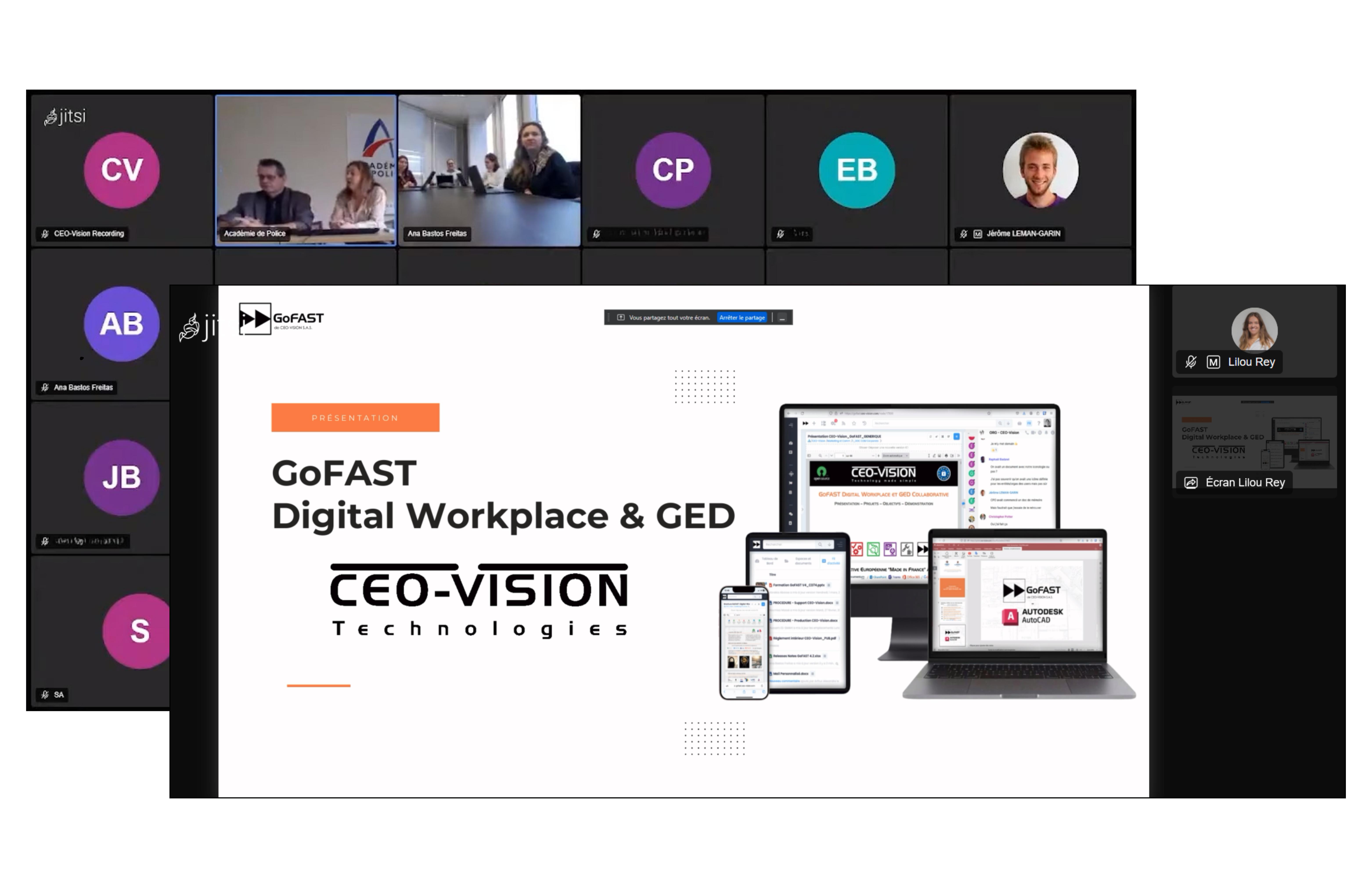
Video conferencing with Jitsi Meet
- Video meetings in one click from the chat
- Screen sharing, collaborative whiteboard, customizable backgrounds
- Breakout rooms and session recording
- Built-in chat during meetings for questions and real-time interaction
- Ensures efficient real-time collaboration, even remotely
These two components are strategic for productivity and communication continuity, as they allow all interactions to remain within the same platform, instead of multiplying tools. They also make it easy to switch from chat to video conferencing: a quick message can turn into a meeting in seconds, without changing tools.
Why look for an alternative to Teams, Zoom, or Google Meet?
Although these tools are popular, they have certain limitations:
- Too many applications and interfaces
- Scattered communications and time loss
- Difficulty in centralizing conversations and documents
- Security and confidentiality risks
Companies are now favoring unified communication solutions that combine chat, meetings, and document management within a single collaborative workspace, reducing information loss and optimizing working time.
Feature comparison table: GoFAST vs Teams / Zoom / Google Meet
| Criteria | GoFAST (Element, Jitsi Meet) | Microsoft Teams | Zoom | Google Meet |
|---|---|---|---|---|
| Sovereignty & Compliance | ||||
| Data hostingPhysical storage location | Sovereign. France/EU (Dassault Outscale) or On-Premise. Data 100 % within national territory. | Non-sovereign. Microsoft Azure cloud (USA). European hosting possible but subject to US law. | Non-sovereign. Zoom servers (USA). No FR/EU sovereign option. | Non-sovereign. Google infrastructure (USA). No sovereign France option. |
| Open source & auditabilityCode transparency | 100 % open source. Stack Alfresco, Bonita, OnlyOffice, Element/Matrix, OpenXChange. Code auditable by clients and partners. | Proprietary. Closed source code, no audit possible by client organizations. | Proprietary. Partially open-source client (WebRTC), fully closed servers. | Proprietary. Infrastructure and server code fully closed. |
| On-premise deploymentInstallation on internal infrastructure | Yes, native. Full installation on the organization's servers, without cloud dependency. | Not available. Teams is exclusively Microsoft cloud SaaS. | Partial. Zoom On-Premise exists but with reduced features and residual cloud dependency. | Not available. Google Meet is exclusively cloud-based. |
| Instant messaging | ||||
| Messaging technologyProtocol and engine | Element / Matrix. Open and federated protocol, interoperable with any third-party Matrix server. | Microsoft proprietary engine. Communication only within the Teams/M365 ecosystem. | Zoom Chat. Limited use within meeting or Zoom team scope. | Google Chat (separate product). Partial Meet/Chat integration depending on Workspace license. |
| Spaces & thematic channels | Yes. Collaboration spaces directly linked to GoFAST document spaces (DMS). | Yes. Team-based channels with strong M365 integration. | Limited. Zoom Team Chat channels available but less structured. | Via Google Chat. Spaces available only on paid Workspace. |
| Inter-organization federationSecure external communication | Yes, via Matrix. Native interoperability with any Matrix server. Federation controlled by the organization. | Partial. Teams ↔ Teams federation only, via Microsoft guest access. | Not available. Zoom silos between organizations. | Not available. External communication outside Workspace not federated. |
| File sharing in chatLink with DMS | Native and integrated with DMS. All shared files are versioned and managed in Alfresco. | Via OneDrive/SharePoint. Document management external to Teams. | Basic sharing, without associated document management. | Link to Google Drive. Document management handled in a separate tool. |
| Threads | Yes. Discussions organized into contextual threads. | Yes. Native threads in channels. | Partial. Threaded replies in Team Chat. | No in Meet. Threads only in Google Chat. |
| Videoconferencing | ||||
| Video technologyEngine and protocol | Jitsi Meet (open source). Server hosted on the organization's infrastructure. No external data flow. | Microsoft proprietary engine. Video data routed through Azure servers (USA). | Zoom proprietary infrastructure. Routing via Zoom servers (USA). | Google Meet proprietary infrastructure. Routing via Google datacenters (USA). |
| Group videoconferencing | Yes. Multi-participant meetings from the GoFAST interface, without third-party apps. | Yes. Up to 300 participants (standard plan). | Yes. 100 to 300 participants depending on subscription. | Yes. Up to 100–500 participants depending on Workspace license. |
| Meeting recording | Yes. Recording stored on the organization's sovereign infrastructure. | Yes. Stored in OneDrive/SharePoint (Microsoft cloud). | Yes. Zoom cloud or local storage depending on subscription. | Paid Workspace license only. Stored in Google Drive. |
| Automatic transcriptionSubtitles and AI summary | In progress. Sovereign AI (Mistral on-premise). Data processed locally, outside US cloud. | Yes, via Microsoft Copilot (paid). AI processed on Microsoft infrastructure (USA). | Yes, via Zoom AI Companion. Data sent to Zoom servers (USA). | Native subtitles. Transcription via Google Workspace. Data processed by Google (USA). |
| Screen sharing | Yes. Screen sharing integrated into Jitsi Meet. | Yes. Native Microsoft sharing and whiteboard. | Yes. Advanced screen sharing and annotation. | Yes. Screen sharing. Optional Google whiteboard. |
| Meetings without mandatory accountExternal guest access | Yes. Shareable meeting link for external participants without a GoFAST account. | Guest access possible, but requires a Microsoft account or Teams Web access. | Yes. Zoom link accessible without account. | Yes. Meet link accessible without Google account. |
GoFAST: an all-in-one collaborative platform
Thanks to chat, video conferencing, document management, workflow, and task management, GoFAST centralizes all information in a single, secure environment. Teams can easily switch from one feature to another, quickly find their documents, and collaborate efficiently.
This centralization ensures the confidentiality of sensitive data, digital sovereignty, and GDPR compliance, while simplifying collaboration. GoFAST is therefore a sovereign and comprehensive alternative to Teams, Zoom, Google Meet, and more broadly Microsoft 365, ideal for large and mid-sized organizations looking to boost productivity, centralize their communications, and secure their critical information.